Generate
Before you use generate — consider using query instead
If you are generating the full decompressed text file so you can import it into a database for lookups, you are almost certainly doing it the hard way.
The query command can look up any password directly against the compressed data store — no decompression, no database import, no extra storage required. It just-in-time decompresses only the single prefix file needed, checks for a match, and returns a result in under a second. This approach is faster to set up, dramatically easier to maintain, and uses a fraction of the storage.
See the query command documentation to understand how this works before deciding you need a generated text file.
The generate command produces a single decompressed text file containing all pwned password hash values in prefix order. This is similar to the single-file output from PwnedPasswordsDownloader by the HIBP team.
This is useful when you need a plain-text export for a specific tool or pipeline that requires the data in this format. For general-purpose password-checking lookups, the query command is a much better fit.
Usage
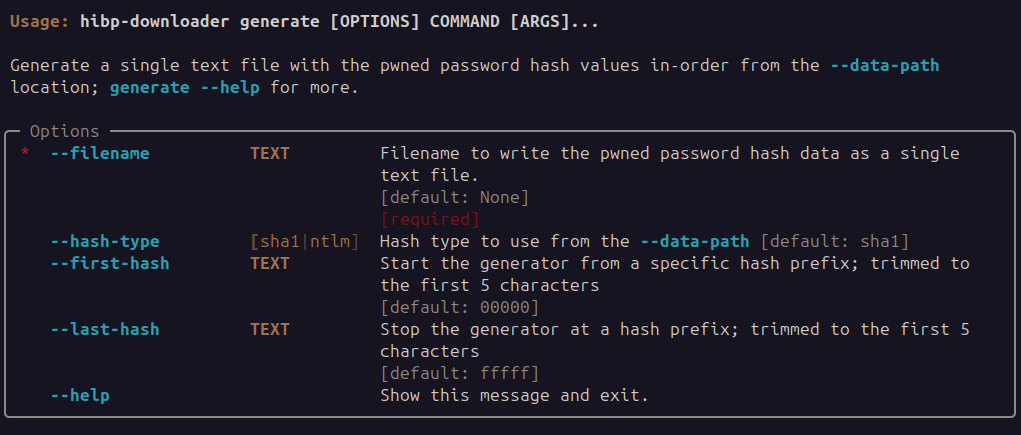
Example
$ hibp-downloader --data-path /opt/storage/hibp-datastore generate --filename /tmp/onebigfile.txt
2023-11-12T21:53:31+1000 | INFO | hibp-downloader | HIBP Downloader: v0.1.5
2023-11-12T21:53:31+1000 | INFO | hibp-downloader | data-path '/opt/storage/hibp-datastore'
2023-11-12T21:53:31+1000 | INFO | hibp-downloader | Prefix position '00000' appending to '/tmp/onebigfile.txt'
2023-11-12T21:53:32+1000 | INFO | hibp-downloader | Prefix position '00190' appending to '/tmp/onebigfile.txt'
2023-11-12T21:53:32+1000 | INFO | hibp-downloader | Prefix position '00320' appending to '/tmp/onebigfile.txt'
2023-11-12T21:53:33+1000 | INFO | hibp-downloader | Prefix position '004b0' appending to '/tmp/onebigfile.txt'