Query
The query command is the recommended way to check passwords against your local HIBP data store.
Rather than decompressing the entire dataset and importing it into a database, query takes a fundamentally smarter approach: it locates the single compressed prefix file where a given password hash would live, decompresses just that one file on-the-fly, and checks for a match. The result is returned in well under a second — even from network-attached storage.
Why query instead of a database?
| Approach | Storage | Maintenance | Complexity |
|---|---|---|---|
query (recommended) | ~17 GB compressed | Just re-run download periodically | None — works directly on the data store |
| Decompress + database import | ~40+ GB uncompressed + DB overhead | Regenerate, re-import, re-index on every update | Database setup, schema, indexing, import pipeline |
The compressed data store from download is all you need. The query command works directly against it — no intermediate steps, no database, no extra storage.
Building a password-checking service?
The query interface is efficient enough to use directly behind a web service at reasonable request loads. Use the --quiet flag to suppress log output and capture only the JSON result. There is no need to decompress the dataset into a database for a lookup service.
How it works
- Takes a SHA1 or NTLM hash of the supplied password.
- Uses the hash prefix to locate the correct compressed data file on disk.
- Decompresses that single file in memory and searches for the full hash.
- Returns the match status and HIBP occurrence count as JSON.
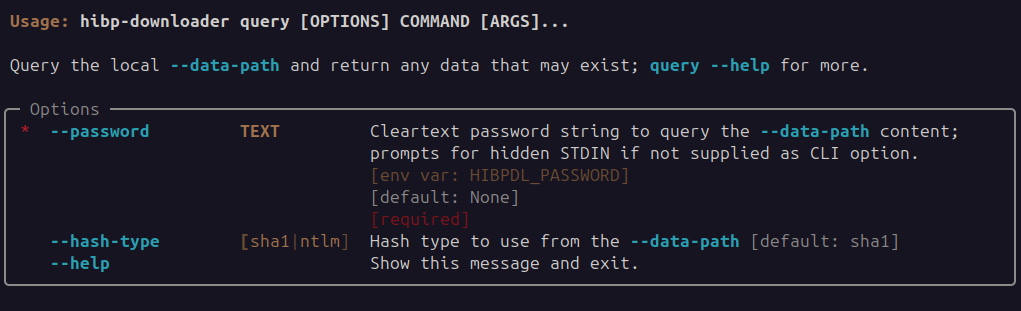
Usage
Caution
By default the CLI will prompt for the password without echoing it. The --password option passes the value directly, but be aware that this may record the password in clear-text in shell history and system logs.
Example: with prompt input
$ hibp-downloader --data-path /opt/storage/hibp-datastore query
2023-11-12T22:03:23+1000 | INFO | hibp-downloader | HIBP Downloader: v0.1.5
Password:
2023-11-12T22:03:26+1000 | INFO | hibp-downloader | data-path '/opt/storage/hibp-datastore'
{
  "data_path": "/opt/storage/hibp-datastore",
  "hash": "8843D7F92416211DE9EBB963FF4CE28125932878",
  "hash_type": "sha1",
  "hibp_count": 19563,
  "status": "Found"
}
Example: using --password option input
$ hibp-downloader --data-path /opt/storage/hibp-datastore query --password foobar
2023-11-12T22:05:38+1000 | INFO | hibp-downloader | HIBP Downloader: v0.1.5
2023-11-12T22:05:38+1000 | INFO | hibp-downloader | data-path '/opt/storage/hibp-datastore'
{
  "data_path": "/opt/storage/hibp-datastore",
  "hash": "8843D7F92416211DE9EBB963FF4CE28125932878",
  "hash_type": "sha1",
  "hibp_count": 19563,
  "status": "Found"
}
Example: query time using --password option
Response time at around 600ms from NFS-backed storage; fast enough to use directly for services.